Stop Re-Explaining Yourself: What a Claude Project Is Actually For
The most useful feature in an AI assistant is rarely the one being demonstrated. It is usually the boring one that removes a chore you had stopped noticing.
For most people that chore is re-explaining themselves. You open a new chat and paste in the same background: who the channel is for, what the tone is, what you already tried, what not to suggest again. Then you do it again tomorrow. Every answer starts from zero because the assistant starts from zero.
A Project is the fix, and it is unglamorous in exactly the way useful things usually are: you upload your files and write your rules once, and every chat inside that Project already knows them.
Set it up once, and stop paying the tax
The setup is five steps and takes about ten minutes. Almost all of the value comes from steps two and three, which are also the two people rush.
| 1. Pick the unit → | 2. Upload the truth → | 3. Write the rules → | 4. Add examples → | 5. Work inside it |
|---|---|---|---|---|
| One channel, one client, one subject
Not “my work”. A Project that covers everything remembers nothing usefully. |
The documents you would hand a new hire
Audience notes, past scripts, the numbers. Facts, not vibes. |
Instructions that survive every chat
Tone, format, what to refuse, what to ask before assuming. |
Two or three pieces of your actual output
Showing beats describing. Your best work teaches faster than adjectives. |
Every new chat starts loaded
You open a chat and go straight to the question. |
Step one is the one people get wrong. A Project called “content” that holds three channels, two clients and a side idea produces answers that are vaguely right for everything and precisely right for nothing. One Project per unit of work – the unit being whatever has its own audience and its own rules.
What actually goes in a channel Project
Concretely, for a YouTube channel. Everything here is material you already have; the work is putting it in one place rather than in your head.
| Upload this | Why it earns its place | Leave out |
|---|---|---|
| Three of your best scripts | Teaches structure and voice far better than describing them. This is the single highest-value file. | Everything you have ever written. Three good ones beat thirty average ones. |
| One page on the viewer | Who they are, what they already tried, what they are afraid of. Stops generic answers at the source. | Demographics with no behaviour attached. “Men 25–40” tells it nothing. |
| Your last 15 videos with the numbers | Lets it reason about what actually worked on your channel rather than on channels in general. | A full export of every metric. Views, click-through rate and retention is enough. |
| Titles that worked and titles that did not | The pattern is learnable from examples and almost impossible to describe in the abstract. | Titles you liked but never published. Only shipped ones carry information. |
| Your rules | Claims you will not make, words you do not use, the format you want back. | Anything aspirational. Rules you do not follow will produce work you reject. |
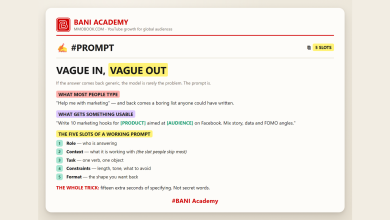
Then the instructions, which do most of the work. The single most useful line to include is some version of ask before assuming – it converts a confident guess into a short question, and a short question into an answer with your real constraints inside it. That is the same mechanism we described in vague in, vague out: the context slot is the one everyone leaves empty, and a Project fills it permanently.
Watch the reel
The before-and-after in thirty seconds, from the ten-feature map. Posted on the BANI Academy page.
Learn the features in this order
Projects sits fourth on most feature maps and second on any sensible learning order. The reason people bounce off assistants is almost always that they jumped to the impressive end and skipped the part that makes the impressive end work.
| Order | What it does | Why here |
|---|---|---|
| 1. Ordinary chat | Everyday thinking and writing. | Learn to specify a job properly before automating anything. |
| 2. Projects | Files and rules that persist across chats. | Removes the repetition tax. Everything after this gets better because of it. |
| 3. Artifacts | Turns an answer into a working tool you can use. | A calculator or tracker you actually keep beats a paragraph you skim. |
| 4. Skills | Your tone and workflow, loaded automatically. | Only worth it once you know what your rules actually are. |
| 5. Connectors | Plugs into the apps your work already lives in. | Ends the copy-paste step, once there is a process to connect. |
The honest limits
Three things worth knowing before you plan a week around this.
It is a paid-plan feature. Projects is not part of the free tier. That matters on a blog that spends a lot of time mapping free options, so it belongs in the first paragraph of any recommendation rather than the small print – and as with every plan detail, confirm the current position on the provider’s own pricing page rather than on a list like this one.
Uploaded files go stale silently. A Project is a snapshot, not a live feed. If your channel changed direction in March and the audience page still describes the old plan, you will get confident answers built on a channel you no longer run. Put a date at the top of every file and re-read them quarterly.
More files is not more context. There is a practical ceiling, and long before you hit it you hit a worse problem: contradictory material. Two style guides that disagree produce answers that split the difference, which is the one outcome nobody wanted. Curate rather than accumulate.
None of that makes it less useful. It makes it a filing system, which is what it is – and filing systems reward the same discipline as everything else that compounds, the one we argued for in the ten habits a channel is actually built on.
Where it fits in the rest of the stack
A Project holds context. It does not hold your numbers, your calendar or your pipeline – those live in the three boards we set out in a bad month is data, not a verdict, and they stay useful whether or not you pay for an assistant.
The neat part is that the two feed each other. The spreadsheet holds what happened; the Project holds what it means and how you write about it. Upload last quarter’s numbers into the Project and the analysis stops being generic advice about consistency and starts being about your fifteen videos.
And if you are still choosing which assistant to put this effort into, the wider map of one tool per job is in sixty AI tools, ten jobs. The prompting habits that make any of them behave are in the hundred-prompt audit – particularly the one that tells the assistant to ask questions before answering, which pairs unusually well with a Project.
Frequently asked questions
How many Projects should I have?
One per unit of work with its own audience and rules. Two channels means two Projects, even if you are the only person running both.
What if my files contradict each other?
You get split-the-difference answers. Pick one source of truth per topic and delete the rest rather than hoping it sorts the conflict out.
Do I still need good prompts inside a Project?
Yes, but shorter ones. The Project fills the context slot permanently, so your prompt only has to carry the task, the constraints and the format.
Is this worth it for one channel?
If you write scripts weekly, yes – the repetition tax is paid weekly too. If you publish monthly, set it up when the pasting starts to annoy you.
Ten minutes, one Project
Do it for the channel or client that matters most, today. Three scripts, one page on the viewer, your last fifteen videos with the numbers, and five rules you actually follow. That is the whole setup.
Then open a chat and ask for something ordinary – five title options, a script outline – and compare the answer against what you would have got from a blank chat. The difference is the point, and you will see it on the first try.
Learning a lot does not make anyone good. Doing a lot does.
If you want the structure that turns that into a habit, that is what our free challenge is built for: no barrier to entry, a genuine commitment to action, and a refundable commitment fee you get back when you finish. You are not paying for the knowledge. You are betting on yourself finishing, and we hold the stake.
Want the exact instructions we put in ours? Comment PROJECTS on the original reel and we will send them over. Leave your name in the comment and we will reply to you directly rather than to the thread.
For more on building channels for English-speaking audiences, that is what we work on at mmoyoutube.com.